
How to Submit Your Business Site to Yahoo! Local
Posted September 22, 2009 | Laura Christianson
Yesterday, I gave you easy, step-by-step instructions for submitting your site to Bing and Bing Local (Bing’s directory of business sites). Today we’re going to do the same thing with Yahoo! Local.
Yahoo! Local is a directory that lists businesses in your area. To create your free listing you first need a Yahoo account.
After logging in to your Yahoo account, go to http://local.yahoo.com/, and scroll to the very bottom of the page (they make things so easy to find, don’t they?)

Under Local Resources, click “Add a Business.”
That’ll take you to a form. Fill in as much of the requested info as you feel comfortable revealing to the world:
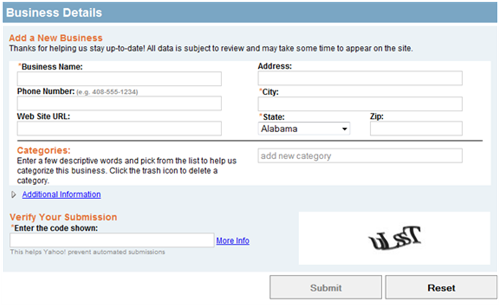
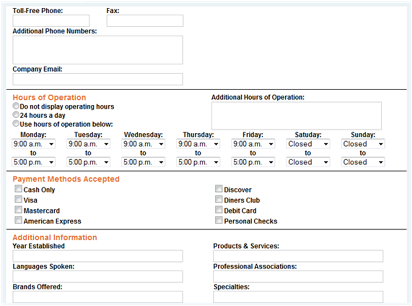
Be sure to click on “Additional Information” link and add:
- Hours of operation
- Payment methods your business accepts
- Products and services you offer
- Company e-mail, fax, and toll free numbers
Click “Submit” and you’re done!
Also in this series:
Victor,
That’s an excellent question; you may want to check with the folks at Yahoo! on that.
My business has a PO Box, and as far as I can recollect, I registered the PO Box with Yahoo! Local. On their map, it displays the location of the post office rather than your business’s physical address, but if you’re okay with that, you should be fine.
Since I run an Internet business, my clients contact me via e-mail or phone call.
Victor,
That’s an excellent question; you may want to check with the folks at Yahoo! on that.
My business has a PO Box, and as far as I can recollect, I registered the PO Box with Yahoo! Local. On their map, it displays the location of the post office rather than your business’s physical address, but if you’re okay with that, you should be fine.
Since I run an Internet business, my clients contact me via e-mail or phone call.
Victor,
That’s an excellent question; you may want to check with the folks at Yahoo! on that.
My business has a PO Box, and as far as I can recollect, I registered the PO Box with Yahoo! Local. On their map, it displays the location of the post office rather than your business’s physical address, but if you’re okay with that, you should be fine.
Since I run an Internet business, my clients contact me via e-mail or phone call.
[…] Contact ← 7 Pros and Cons of Group Blogging How to Submit Your Business Site to Yahoo! Local → […]
[…] Contact ← 7 Pros and Cons of Group Blogging How to Submit Your Business Site to Yahoo! Local → […]